
 Christoper Macaranas
It’s not just about keywords or writing good content. Technical SEO makes sure your website is fast, secure, easy to navigate, and built in a way that search engines can fully understand.
Think of your website like a car. The design and content are the shiny paint and stylish bodywork, but the engine, tires, and fuel system are the things that keep it running smoothly, representing technical SEO. Without those working correctly, your site won’t perform at its best.
In 2025, technical SEO optimization matters more than ever. Search engines are becoming increasingly intelligent, users expect instant results, and competition continues to grow. If your site loads slowly, isn’t mobile-friendly, or lacks security, you’ll lose both rankings and visitors. The good news? With the right technical SEO services, you can address all of these issues and provide your website with the solid foundation it needs to succeed.
This guide will show you exactly what technical SEO is, why it’s important for your business, and how professional optimization services can help your site run faster, rank higher, and deliver a better experience for your visitors.
What Is Technical SEO?
Technical SEO is the process of optimizing the technical aspects of your website so that search engines can easily find, understand, and rank it.
While regular SEO focuses on what people see, like blog posts, product pages, or videos, technical SEO works in the background. It makes sure that:
- Your site loads quickly.
- Google can crawl and index your pages.
- The design works on all devices.
- Your website is secure and trustworthy.
In simple terms, technical SEO is what makes your site both search engine-friendly and user-friendly.
Why Is Technical SEO Important for Your Website?
You might be asking, “Do I really need to worry about this?” The answer is yes if you want your website to succeed in 2025 and beyond.
Here’s why:
- Better rankings on Google – If your site isn’t optimized technically, Google may not even index it. That means no matter how great your content is, people won’t find it.
- Faster user experience – Slow websites frustrate visitors. A delay of just 2–3 seconds can make people leave.
- Mobile-first indexing – Google now prioritizes your mobile site over your desktop version. If your site doesn’t work well on phones, you’ll fall behind.
- Trust and security – HTTPS and a secure setup build credibility. Without it, users see warnings like “Not Secure,” which deter them.
- Competitive advantage – If your competitors invest in technical SEO and you don’t, they’ll outrank you.
Simply put: technical SEO is the foundation of online success. Without it, every other marketing effort is weaker.
Sample of Core Web Vital Score Before and After SEO Specialist PH Conduct Technical SEO Optimization:
Before Core Web Vitals Score:
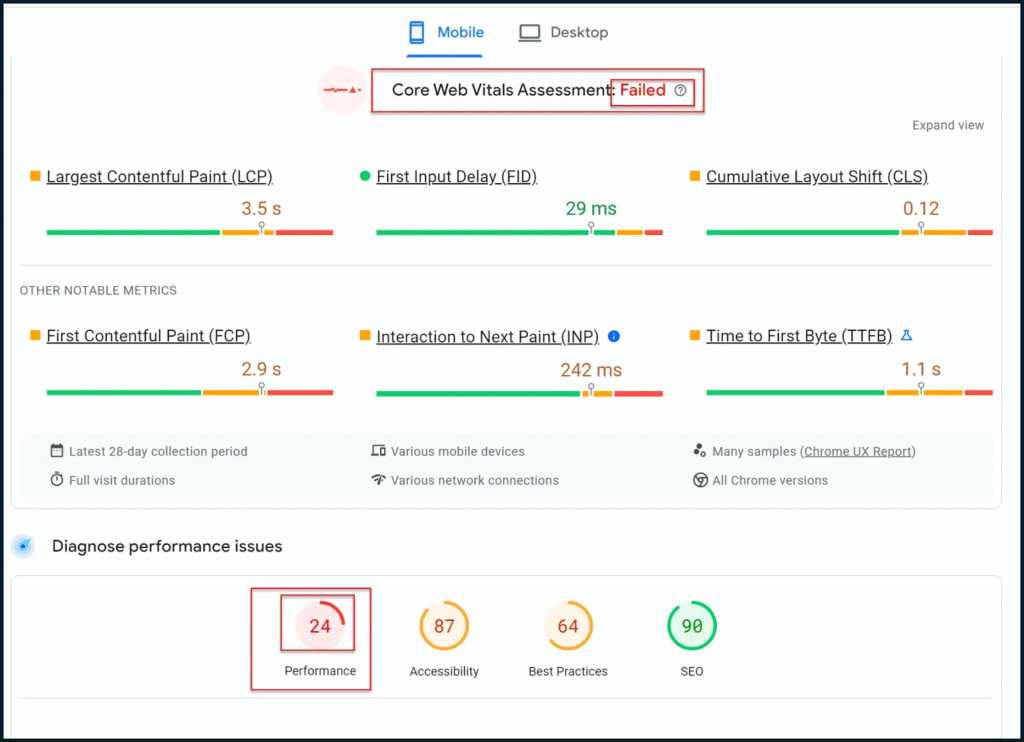
- Performance: 24 (Poor)
- Accessibility: 87 (Average)
- Best Practices: 64 (Average
- SEO: 90 (Good)
Visitors experienced slow loading, laggy interactions, and shifting layouts, which hurt both rankings and user satisfaction.
After My Technical Optimization, Core Web Vitals Score:
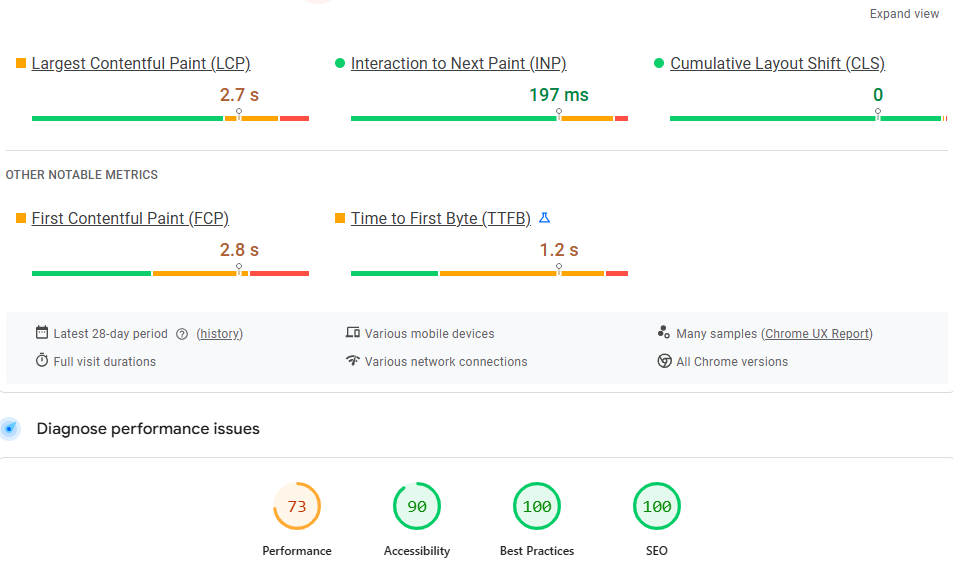
- Performance: 73 (Improved)
- Accessibility: 90 (Good)
- Best Practices:100 (Good)
- SEO: 100 (Good)
Now the website loads almost instantly, responds quickly to clicks, and feels smooth and stable, resulting in better user experience and improved search visibility.
Key Components of Technical SEO You Must Focus On
When it comes to improving your website, there are a few technical SEO essentials you simply can’t ignore. Think of these as the “must-haves” if you want search engines like Google to find your site, understand it, and rank it higher. Let’s break them down one by one in simple terms:
Crawlability & Indexability – Can Search Engines Find You?
If Google or Bing can’t “crawl” your website, your pages won’t even show up in search results. Crawlability refers to how easily search engines can navigate through your site. You need to ensure that your sitemap is up to date, your robots.txt file isn’t blocking important pages, and your internal links direct Google to the content that matters most.
In short, if search engines can’t find your content, people can’t either.
Site Architecture & URL Structure: Organize It Like a Library
Imagine walking into a library where books are scattered everywhere. You’d never find what you’re looking for. Your website works the same way. A clean, well-organized structure makes it easy for both visitors and search engines to know exactly where they are.
Use simple, readable URLs, such as yoursite.com/blog/seo-tips, instead of messy links with random numbers or symbols. This way, people and search engines instantly understand what the page is about.
Site Speed & Core Web Vitals – Faster Websites Win
Nobody likes waiting for a slow website. In fact, a few seconds of delay can cause visitors to leave and never return. Google also uses site speed as a ranking factor, so a slow site can negatively impact your visibility.
To speed things up, compress large images, choose a reliable hosting provider, and remove unnecessary code or plugins. Remember: the faster your site loads, the better the experience you provide for your visitors.
Mobile Usability – Your Website Must Work Everywhere
In 2025, most of your visitors are likely browsing from their phones. If your buttons are too small, text is hard to read, or the layout breaks on a small screen, people will leave quickly. Google also prioritizes mobile-friendly websites.
Always test how your site looks on different devices. A smooth, responsive design ensures that visitors can enjoy your site on any device they use.
HTTPS & Security – Trust Matters Online
Would you type your personal details into a website that isn’t secure? Probably not, and your visitors feel the same way. That’s why HTTPS (the little padlock in the browser bar) is essential. It protects user data, builds trust, and is also a ranking signal for Google.
If your site still displays “Not Secure,” it’s time to install an SSL certificate.
Structured Data (Schema) – Help Google Help You
Structured data, also called schema, is like giving Google a cheat sheet about your content. It helps search engines understand the details of your page and display extra info in search results.
For example, if you post a recipe, schema can show cooking time, calories, and star ratings directly in Google results. This makes your listing more eye-catching and increases your chances of getting clicks.
By focusing on these six areas: crawlability, structure, speed, mobile, security, and schema, you give your website a strong technical foundation. It’s like making sure your digital “engine” runs smoothly so your content can shine.
Steps to Perform a Technical SEO Audit
Doing a technical SEO website audit might sound complicated, but it’s really just about checking how well your website is running behind the scenes. Think of it as giving your site a regular health check-up. Here’s a simple step-by-step process you can follow:
Run an Initial Crawl & Site Audit – See What’s Really Happening
Start by scanning your website with tools like Screaming Frog, Sitebulb, or even Ahrefs Site Audit. These tools crawl your site just like Google does and highlight problems such as missing titles, duplicate content, or broken links.
This first crawl provides a comprehensive view of what’s working and what needs improvement.
Review Crawl Errors & Index Status – Fix What’s Broken
Go to your Google Search Console and check for crawl errors. Are there broken links, redirect loops, or pages that aren’t being indexed? Ensure that your important pages appear in Google and that nothing is being blocked by mistake.
If a page isn’t indexed, it effectively doesn’t exist online, so fixing this step is crucial.
Speed & Performance Tests – Make Your Site Faster
A slow website drives visitors away and hurts your rankings. Test your site speed with tools like Google PageSpeed Insights, GTmetrix, or Pingdom.
Be cautious of heavy images, unnecessary scripts, or excessive plugins that can slow you down. Even small changes, such as compressing images or enabling caching, can significantly improve your site’s speed.
Mobile Testing – Make Sure It Works on Every Device
With most traffic now coming from mobile devices, your site must look and function well on phones and tablets. Use Google’s Mobile-Friendly Test to see if your site passes.
If the test flags problems such as tiny fonts, overlapping text, or layouts that don’t adjust, fix them immediately. A smooth mobile experience means more visitors will stay on your site.
Check Security & HTTPS Setup – Build Trust Instantly
Look at your browser bar. Do you see a padlock? If not, your site isn’t secure. That “Not Secure” warning scares people away and signals to Google to lower your rankings.
The fix is simple: install and configure an SSL certificate so your site runs on HTTPS. This keeps data safe and builds trust with your visitors.
Assess Structured Data Implementation – Stand Out in Google Results
Structured data, also known as schema, helps Google better understand your content. It also allows your site to display additional details in search results, such as star ratings, event dates, or product information.
If you publish blogs, products, or reviews, adding schema can make your listings more eye-catching and increase your click-through rate.
List of Technical SEO Tools You Can Use
Here are some popular tools you can rely on:
- Google Search Console – Free, tracks indexing and errors.
- Screaming Frog – Powerful crawl analysis.
- SEMrush / Ahrefs – Full SEO platforms with technical checks.
- PageSpeed Insights – Google’s tool for site speed.
- GTmetrix – Detailed performance testing.
- Sitebulb – User-friendly SEO audits.
- Technical SEO – Create detailed Schema Markup Code.
- WP Rocket Plugin – Popular WordPress Technical Optimization Plugin.
How Technical SEO Services Drive Real Results
When you work with a professional, you don’t just get a checklist; you get real growth. Here’s how technical SEO services make a difference:
- Higher search rankings.
- Better user experience.
- More leads and sales.
- Stronger brand trust.
- Long-term stability in search results.
Technical SEO: Common Problems to Watch For
Some of the most significant issues that hold websites back include:
- Duplicate content.
- Broken links.
- Slow-loading pages.
- Poor mobile layouts.
- Missing sitemaps.
- Insecure (HTTP) websites.
Spotting and fixing these early saves you from losing valuable traffic.
Why You Should Choose SEO Specialist PH in Technical SEO Optimization Service Right Now
The online world moves fast, and in 2025, websites that load slowly, break on mobile devices, or display a “Not Secure” warning risk losing both visitors and rankings. That’s where SEO Specialist PH makes the difference.
When you choose my technical SEO optimization services, you’re not just fixing problems; you’re building a website that works harder for you every single day. I’ll help you:
- Boost your speed and Core Web Vitals so your pages load instantly.
- Make your site mobile-friendly for the majority of visitors who browse on phones.
- Secure your website with HTTPS to build trust with both users and search engines.
- Organize your structure and links so Google and your visitors find exactly what they need.
- Add schema markup to make your content stand out in search results.
The longer you wait, the more ground you lose to competitors who are already optimizing. But by acting now with SEO Specialist PH, you give your website the tune-up it needs to rank higher, attract more clicks, and convert visitors into customers.
Don’t wait until problems pile up. Start today with SEO Specialist PH’s Technical SEO Optimization Services, and set your business on the path to stronger visibility, more leads, and long-term growth.
FAQ: Technical SEO Services
What do technical SEO services include?
Technical SEO services typically include enhancing site speed, resolving crawl errors, optimizing for mobile devices, securing your site with HTTPS, setting up structured data, and ensuring search engines can easily index your pages.
Can I handle technical SEO on my own?
Yes, you can start with free tools like Google Search Console or PageSpeed Insights. However, technical SEO can become complex, and working with an expert helps you avoid mistakes and ensures that all issues are appropriately addressed and resolved.
How often should I run a technical SEO audit?
At a minimum, you should audit your site every quarter. If your website is extensive or frequently updated, monthly audits are better for catching issues early.
Will technical SEO really improve my rankings?
Yes. Without strong technical SEO, even excellent content won’t reach its full ranking potential. A well-optimized website helps search engines crawl your pages faster and improves user experience, both of which boost your rankings.
How long does it take to see results from technical SEO?
Some changes, such as speeding up your site, can yield results within days. Others, such as fixing indexing issues or improving structured data, may take several weeks before you notice any ranking improvements.
What’s the difference between technical SEO and content SEO?
Technical SEO focuses on the backend of your site, including aspects such as speed, structure, and crawlability. Content SEO is about what your readers see, keywords, blog posts, and articles. Both work together to help you rank higher.
What are the best tools for technical SEO in 2025?
Some of the most valuable tools include Google Search Console, Screaming Frog, Ahrefs, SEMrush, and GTmetrix. These tools help you track performance, find errors, and fix issues quickly.
Why is mobile optimization so crucial for SEO?
Google now uses mobile-first indexing, which means it prioritizes your mobile site over your desktop version. If your site isn’t mobile-friendly, your rankings will drop even if your desktop site looks perfect.
How much do technical SEO services cost?
The price depends on the size and complexity of your site. Smaller websites may only require basic fixes, while larger sites necessitate more comprehensive audits and ongoing optimization.
Can technical SEO help prevent future problems?
Yes. Regular technical SEO audits act like a health check for your website. By addressing issues early, you can prevent ranking drops, avoid costly repairs later, and maintain a smooth-running site.
Ready to Boost Your Website’s Core Web Vitals?
If you want higher rankings, faster pages, and happier visitors in 2025, the best time to act is now. Every day you wait, you risk losing clicks, sales, and trust to competitors who are already optimizing their strategies. By using SEO Specialist PH website audit services, you can fix technical issues before they cost you traffic. Taking action today means securing better visibility, stronger credibility, and long-term growth for your business.
Let’s Improve Your Technical SEO Together
At SEO Specialist PH, I’ll help you fix what’s slowing your site down, make it more secure, and give it the boost it needs to stand out on Google. Whether you need a quick checkup or complete optimization, I’ve got you covered.
Click here to contact me today, and let’s start turning your website into one that both visitors and search engines love.
Free Technical Optimization Checklist
Technical Optimization Checklist

